📱 iOS app UI starter. Paste the design link below into Claude Code, Rork, Lovable, or your AI app builder and ask it to start from this design. These are UI starters. Add your own backend/data logic.
Human and curious? This structured page is what coding agents read. See how the whole flow works →
Grateful — Journal
A daily gratitude journal with gentle prompts and a calm entry feed.
#Journaling #Calm #Warm
https://vp0.com/source/grateful-journalnpx vp0com add grateful-journal --target react-nativeOr skip the paste
Install the free VP0 MCP once and your AI builder can search and import any design by name, with no link to copy and no API key.
claude mcp add vp0 -- npx -y vp0-mcp{
"mcpServers": {
"vp0": { "command": "npx", "args": ["-y", "vp0-mcp"] }
}
}Use with AI
Build this iOS app design in my project: "Grateful — Journal" — A daily gratitude journal with gentle prompts and a calm entry feed.. 1. Fetch https://api.vp0.com/designs/grateful-journal/manifest — a JSON manifest whose files[] array contains EVERY source file inline (path + content). 2. Create each file at its exact files[].path and paste its content VERBATIM. Do not re-imagine or restyle the UI — the provided code IS the design. 3. Install dependencies exactly as given by the manifest's installCommand field (skip if null). 4. Render the entry component (targets[].entrypoint) from a screen. Keep SafeAreaView / safe-area insets and the existing styling untouched. 5. It is a UI starter: once it renders pixel-perfect, wire my own data, navigation and backend on top. Human-readable source page: https://vp0.com/source/grateful-journal
This is an iOS app UI starter for Expo React Native ("Grateful — Journal").
Integrate it into the user's Expo project as follows:
1. No extra dependencies are required.
2. Create the following file(s) and paste each provided "content" exactly:
   - App.tsx
3. Render the exported component from a screen (e.g. app/(tabs)/index.tsx). It targets iOS — keep SafeAreaView / safe-area insets and the existing styling.
4. These are UI starters: reproduce the visual layout faithfully, then wire the user's own data/navigation/backend afterward.
Paste-ready prompts per builder
Claude Code
Build this iOS app design in my project.
If the vp0 MCP server is connected, use its tools to import "grateful-journal" directly. Otherwise run `npx vp0com add grateful-journal --target react-native`, or follow the steps below.
1. Fetch https://api.vp0.com/r/grateful-journal.json: a JSON manifest whose files[] array contains EVERY source file inline (path + content).
2. Create each file at its exact files[].path and paste its content VERBATIM. Do not re-imagine or restyle the UI: the provided code IS the design.
3. Install dependencies exactly as given by the manifest's installCommand field (skip if null).
4. Render the entry component (targets[].entrypoint) from a screen. Keep SafeAreaView / safe-area insets and the existing styling untouched.
5. It is a UI starter: once it renders pixel-perfect, wire my own data, navigation and backend on top.
Human-readable source page: https://vp0.com/source/grateful-journal
Cursor
Build this iOS app design in my project.
In agent mode, run `npx vp0com add grateful-journal --target react-native` in the terminal, or follow the steps below.
1. Fetch https://api.vp0.com/r/grateful-journal.json: a JSON manifest whose files[] array contains EVERY source file inline (path + content).
2. Create each file at its exact files[].path and paste its content VERBATIM. Do not re-imagine or restyle the UI: the provided code IS the design.
3. Install dependencies exactly as given by the manifest's installCommand field (skip if null).
4. Render the entry component (targets[].entrypoint) from a screen. Keep SafeAreaView / safe-area insets and the existing styling untouched.
5. It is a UI starter: once it renders pixel-perfect, wire my own data, navigation and backend on top.
Human-readable source page: https://vp0.com/source/grateful-journal
Rork
Build this iOS app design in my project. It is React Native (Expo-compatible), so use the files as-is.
1. Fetch https://api.vp0.com/r/grateful-journal.json: a JSON manifest whose files[] array contains EVERY source file inline (path + content).
2. Create each file at its exact files[].path and paste its content VERBATIM. Do not re-imagine or restyle the UI: the provided code IS the design.
3. Install dependencies exactly as given by the manifest's installCommand field (skip if null).
4. Render the entry component (targets[].entrypoint) from a screen. Keep SafeAreaView / safe-area insets and the existing styling untouched.
5. It is a UI starter: once it renders pixel-perfect, wire my own data, navigation and backend on top.
Human-readable source page: https://vp0.com/source/grateful-journal
Lovable
Build this iOS app design in my project. The source is React Native (Expo-compatible); if your stack differs, recreate every screen faithfully: keep layout, spacing, colors and typography exactly as in the code.
1. Fetch https://api.vp0.com/r/grateful-journal.json: a JSON manifest whose files[] array contains EVERY source file inline (path + content).
2. Create each file at its exact files[].path and paste its content VERBATIM. Do not re-imagine or restyle the UI: the provided code IS the design.
3. Install dependencies exactly as given by the manifest's installCommand field (skip if null).
4. Render the entry component (targets[].entrypoint) from a screen. Keep SafeAreaView / safe-area insets and the existing styling untouched.
5. It is a UI starter: once it renders pixel-perfect, wire my own data, navigation and backend on top.
Human-readable source page: https://vp0.com/source/grateful-journal
v0 by Vercel
Recreate this iOS app design. The manifest below contains every source file; keep layout, spacing, colors and typography exactly as in the code.
1. Fetch https://api.vp0.com/r/grateful-journal.json: a JSON manifest whose files[] array contains EVERY source file inline (path + content).
2. Create each file at its exact files[].path and paste its content VERBATIM. Do not re-imagine or restyle the UI: the provided code IS the design.
3. Install dependencies exactly as given by the manifest's installCommand field (skip if null).
4. Render the entry component (targets[].entrypoint) from a screen. Keep SafeAreaView / safe-area insets and the existing styling untouched.
5. It is a UI starter: once it renders pixel-perfect, wire my own data, navigation and backend on top.
Human-readable source page: https://vp0.com/source/grateful-journal
Bolt
Build this iOS app design in my project. The source is React Native (Expo-compatible); if your stack differs, recreate every screen faithfully: keep layout, spacing, colors and typography exactly as in the code.
1. Fetch https://api.vp0.com/r/grateful-journal.json: a JSON manifest whose files[] array contains EVERY source file inline (path + content).
2. Create each file at its exact files[].path and paste its content VERBATIM. Do not re-imagine or restyle the UI: the provided code IS the design.
3. Install dependencies exactly as given by the manifest's installCommand field (skip if null).
4. Render the entry component (targets[].entrypoint) from a screen. Keep SafeAreaView / safe-area insets and the existing styling untouched.
5. It is a UI starter: once it renders pixel-perfect, wire my own data, navigation and backend on top.
Human-readable source page: https://vp0.com/source/grateful-journal
Replit
Build this iOS app design in my project. The source is React Native (Expo-compatible); if your stack differs, recreate every screen faithfully: keep layout, spacing, colors and typography exactly as in the code.
1. Fetch https://api.vp0.com/r/grateful-journal.json: a JSON manifest whose files[] array contains EVERY source file inline (path + content).
2. Create each file at its exact files[].path and paste its content VERBATIM. Do not re-imagine or restyle the UI: the provided code IS the design.
3. Install dependencies exactly as given by the manifest's installCommand field (skip if null).
4. Render the entry component (targets[].entrypoint) from a screen. Keep SafeAreaView / safe-area insets and the existing styling untouched.
5. It is a UI starter: once it renders pixel-perfect, wire my own data, navigation and backend on top.
Human-readable source page: https://vp0.com/source/grateful-journal
Preview
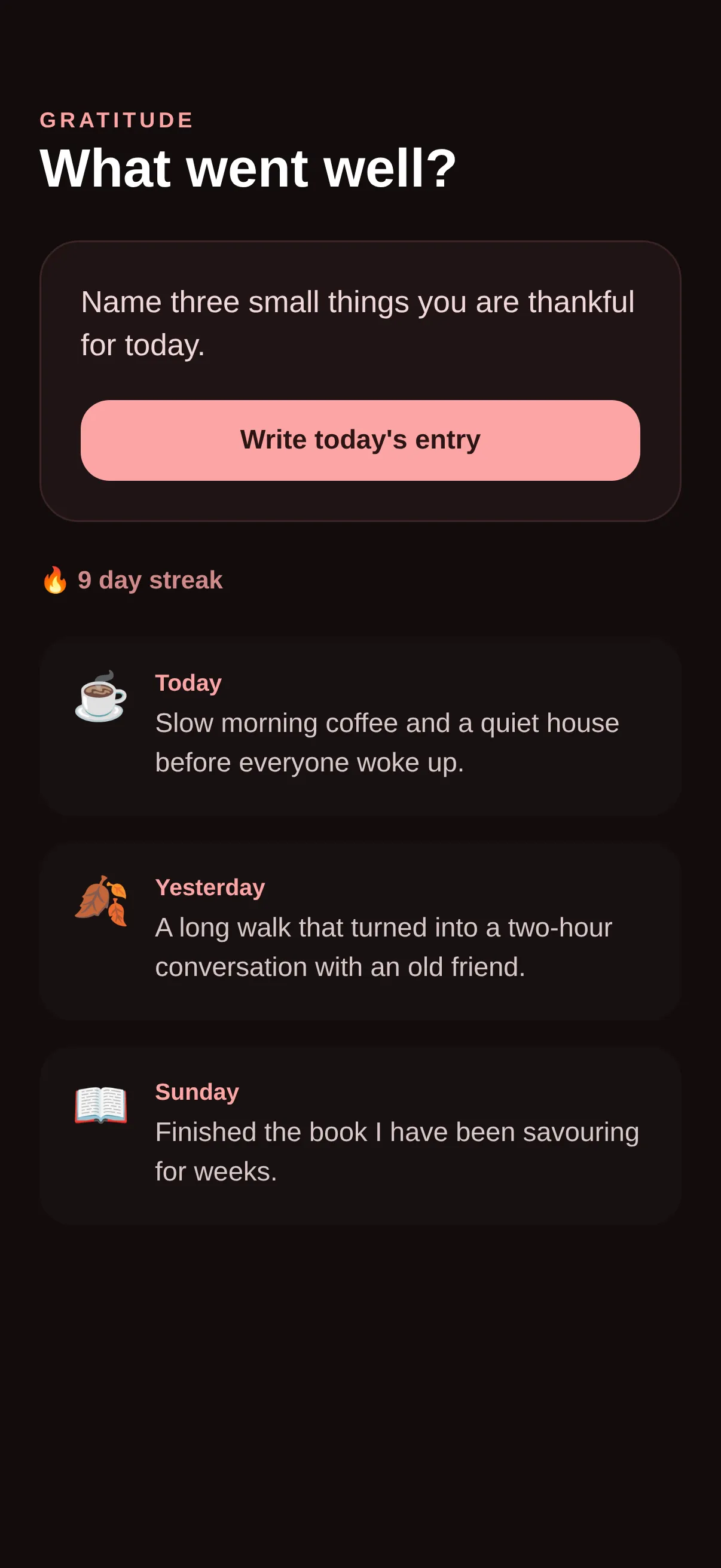
Code · 1 file
React Nativeimport React from 'react';
import { View, Text, ScrollView, StyleSheet, SafeAreaView } from 'react-native';
const ENTRIES = [
{ day: 'Today', text: 'Slow morning coffee and a quiet house before everyone woke up.', emoji: '☕' },
{ day: 'Yesterday', text: 'A long walk that turned into a two-hour conversation with an old friend.', emoji: '🍂' },
{ day: 'Sunday', text: 'Finished the book I have been savouring for weeks.', emoji: '📖' },
];
export default function App() {
return (
<SafeAreaView style={s.safe}>
<ScrollView contentContainerStyle={s.scroll} showsVerticalScrollIndicator={false}>
<Text style={s.kicker}>GRATITUDE</Text>
<Text style={s.h1}>What went well?</Text>
<View style={s.prompt}>
<Text style={s.promptText}>Name three small things you are thankful for today.</Text>
<View style={s.promptBtn}><Text style={s.promptBtnT}>Write today's entry</Text></View>
</View>
<Text style={s.streak}>🔥 9 day streak</Text>
{ENTRIES.map((e, i) => (
<View key={i} style={s.entry}>
<Text style={s.entryEmoji}>{e.emoji}</Text>
<View style={{ flex: 1 }}>
<Text style={s.entryDay}>{e.day}</Text>
<Text style={s.entryText}>{e.text}</Text>
</View>
</View>
))}
</ScrollView>
</SafeAreaView>
);
}
const s = StyleSheet.create({
safe: { flex: 1, backgroundColor: '#120C0C' },
scroll: { padding: 22, paddingTop: 60 },
kicker: { color: '#FCA5A5', fontSize: 12, fontWeight: '700', letterSpacing: 2 },
h1: { color: '#fff', fontSize: 30, fontWeight: '800', marginTop: 4, marginBottom: 22 },
prompt: { backgroundColor: '#201415', borderRadius: 22, padding: 22, borderWidth: 1, borderColor: '#3A2425' },
promptText: { color: '#F0D8D8', fontSize: 17, lineHeight: 24, fontWeight: '500' },
promptBtn: { backgroundColor: '#FCA5A5', borderRadius: 16, paddingVertical: 14, alignItems: 'center', marginTop: 18 },
promptBtnT: { color: '#2A1414', fontSize: 15, fontWeight: '800' },
streak: { color: '#D08A8A', fontSize: 14, fontWeight: '700', marginVertical: 24 },
entry: { flexDirection: 'row', backgroundColor: '#181011', borderRadius: 18, padding: 18, marginBottom: 14 },
entryEmoji: { fontSize: 26, marginRight: 14 },
entryDay: { color: '#FCA5A5', fontSize: 13, fontWeight: '700' },
entryText: { color: '#D8C8C8', fontSize: 15, lineHeight: 22, marginTop: 5 },
});
Machine endpoints
- Manifest (JSON):/designs/grateful-journal/manifest
- Registry alias:/r/grateful-journal.json
- File tree:/designs/grateful-journal/files
- Download bundle (.zip):/designs/grateful-journal/bundle.zip
- Bundle JSON Schema:/schema/vp0-bundle.v1.json
- Registry index (all designs):/registry.json
Open, CORS-enabled, no key. React Native is the default target; append ?target=swiftui where SwiftUI is available.