📱 iOS app UI starter. Paste the design link below into Claude Code, Rork, Lovable, or your AI app builder and ask it to start from this design. These are UI starters. Add your own backend/data logic.
Human and curious? This structured page is what coding agents read. See how the whole flow works →
Tide — Mood Journal
Log how you feel with a tap and watch your week take shape in color.
#Journaling #Mood Tracking #Colorful
https://vp0.com/source/tide-mood-journalnpx vp0com add tide-mood-journal --target react-nativeOr skip the paste
Install the free VP0 MCP once and your AI builder can search and import any design by name, with no link to copy and no API key.
claude mcp add vp0 -- npx -y vp0-mcp{
"mcpServers": {
"vp0": { "command": "npx", "args": ["-y", "vp0-mcp"] }
}
}Use with AI
Build this iOS app design in my project: "Tide — Mood Journal" — Log how you feel with a tap and watch your week take shape in color.. 1. Fetch https://api.vp0.com/designs/tide-mood-journal/manifest — a JSON manifest whose files[] array contains EVERY source file inline (path + content). 2. Create each file at its exact files[].path and paste its content VERBATIM. Do not re-imagine or restyle the UI — the provided code IS the design. 3. Install dependencies exactly as given by the manifest's installCommand field (skip if null). 4. Render the entry component (targets[].entrypoint) from a screen. Keep SafeAreaView / safe-area insets and the existing styling untouched. 5. It is a UI starter: once it renders pixel-perfect, wire my own data, navigation and backend on top. Human-readable source page: https://vp0.com/source/tide-mood-journal
This is an iOS app UI starter for Expo React Native ("Tide — Mood Journal").
Integrate it into the user's Expo project as follows:
1. No extra dependencies are required.
2. Create the following file(s) and paste each provided "content" exactly:
   - App.tsx
3. Render the exported component from a screen (e.g. app/(tabs)/index.tsx). It targets iOS — keep SafeAreaView / safe-area insets and the existing styling.
4. These are UI starters: reproduce the visual layout faithfully, then wire the user's own data/navigation/backend afterward.
Paste-ready prompts per builder
Claude Code
Build this iOS app design in my project.
If the vp0 MCP server is connected, use its tools to import "tide-mood-journal" directly. Otherwise run `npx vp0com add tide-mood-journal --target react-native`, or follow the steps below.
1. Fetch https://api.vp0.com/r/tide-mood-journal.json: a JSON manifest whose files[] array contains EVERY source file inline (path + content).
2. Create each file at its exact files[].path and paste its content VERBATIM. Do not re-imagine or restyle the UI: the provided code IS the design.
3. Install dependencies exactly as given by the manifest's installCommand field (skip if null).
4. Render the entry component (targets[].entrypoint) from a screen. Keep SafeAreaView / safe-area insets and the existing styling untouched.
5. It is a UI starter: once it renders pixel-perfect, wire my own data, navigation and backend on top.
Human-readable source page: https://vp0.com/source/tide-mood-journal
Cursor
Build this iOS app design in my project.
In agent mode, run `npx vp0com add tide-mood-journal --target react-native` in the terminal, or follow the steps below.
1. Fetch https://api.vp0.com/r/tide-mood-journal.json: a JSON manifest whose files[] array contains EVERY source file inline (path + content).
2. Create each file at its exact files[].path and paste its content VERBATIM. Do not re-imagine or restyle the UI: the provided code IS the design.
3. Install dependencies exactly as given by the manifest's installCommand field (skip if null).
4. Render the entry component (targets[].entrypoint) from a screen. Keep SafeAreaView / safe-area insets and the existing styling untouched.
5. It is a UI starter: once it renders pixel-perfect, wire my own data, navigation and backend on top.
Human-readable source page: https://vp0.com/source/tide-mood-journal
Rork
Build this iOS app design in my project. It is React Native (Expo-compatible), so use the files as-is.
1. Fetch https://api.vp0.com/r/tide-mood-journal.json: a JSON manifest whose files[] array contains EVERY source file inline (path + content).
2. Create each file at its exact files[].path and paste its content VERBATIM. Do not re-imagine or restyle the UI: the provided code IS the design.
3. Install dependencies exactly as given by the manifest's installCommand field (skip if null).
4. Render the entry component (targets[].entrypoint) from a screen. Keep SafeAreaView / safe-area insets and the existing styling untouched.
5. It is a UI starter: once it renders pixel-perfect, wire my own data, navigation and backend on top.
Human-readable source page: https://vp0.com/source/tide-mood-journal
Lovable
Build this iOS app design in my project. The source is React Native (Expo-compatible); if your stack differs, recreate every screen faithfully: keep layout, spacing, colors and typography exactly as in the code.
1. Fetch https://api.vp0.com/r/tide-mood-journal.json: a JSON manifest whose files[] array contains EVERY source file inline (path + content).
2. Create each file at its exact files[].path and paste its content VERBATIM. Do not re-imagine or restyle the UI: the provided code IS the design.
3. Install dependencies exactly as given by the manifest's installCommand field (skip if null).
4. Render the entry component (targets[].entrypoint) from a screen. Keep SafeAreaView / safe-area insets and the existing styling untouched.
5. It is a UI starter: once it renders pixel-perfect, wire my own data, navigation and backend on top.
Human-readable source page: https://vp0.com/source/tide-mood-journal
v0 by Vercel
Recreate this iOS app design. The manifest below contains every source file; keep layout, spacing, colors and typography exactly as in the code.
1. Fetch https://api.vp0.com/r/tide-mood-journal.json: a JSON manifest whose files[] array contains EVERY source file inline (path + content).
2. Create each file at its exact files[].path and paste its content VERBATIM. Do not re-imagine or restyle the UI: the provided code IS the design.
3. Install dependencies exactly as given by the manifest's installCommand field (skip if null).
4. Render the entry component (targets[].entrypoint) from a screen. Keep SafeAreaView / safe-area insets and the existing styling untouched.
5. It is a UI starter: once it renders pixel-perfect, wire my own data, navigation and backend on top.
Human-readable source page: https://vp0.com/source/tide-mood-journal
Bolt
Build this iOS app design in my project. The source is React Native (Expo-compatible); if your stack differs, recreate every screen faithfully: keep layout, spacing, colors and typography exactly as in the code.
1. Fetch https://api.vp0.com/r/tide-mood-journal.json: a JSON manifest whose files[] array contains EVERY source file inline (path + content).
2. Create each file at its exact files[].path and paste its content VERBATIM. Do not re-imagine or restyle the UI: the provided code IS the design.
3. Install dependencies exactly as given by the manifest's installCommand field (skip if null).
4. Render the entry component (targets[].entrypoint) from a screen. Keep SafeAreaView / safe-area insets and the existing styling untouched.
5. It is a UI starter: once it renders pixel-perfect, wire my own data, navigation and backend on top.
Human-readable source page: https://vp0.com/source/tide-mood-journal
Replit
Build this iOS app design in my project. The source is React Native (Expo-compatible); if your stack differs, recreate every screen faithfully: keep layout, spacing, colors and typography exactly as in the code.
1. Fetch https://api.vp0.com/r/tide-mood-journal.json: a JSON manifest whose files[] array contains EVERY source file inline (path + content).
2. Create each file at its exact files[].path and paste its content VERBATIM. Do not re-imagine or restyle the UI: the provided code IS the design.
3. Install dependencies exactly as given by the manifest's installCommand field (skip if null).
4. Render the entry component (targets[].entrypoint) from a screen. Keep SafeAreaView / safe-area insets and the existing styling untouched.
5. It is a UI starter: once it renders pixel-perfect, wire my own data, navigation and backend on top.
Human-readable source page: https://vp0.com/source/tide-mood-journal
Preview
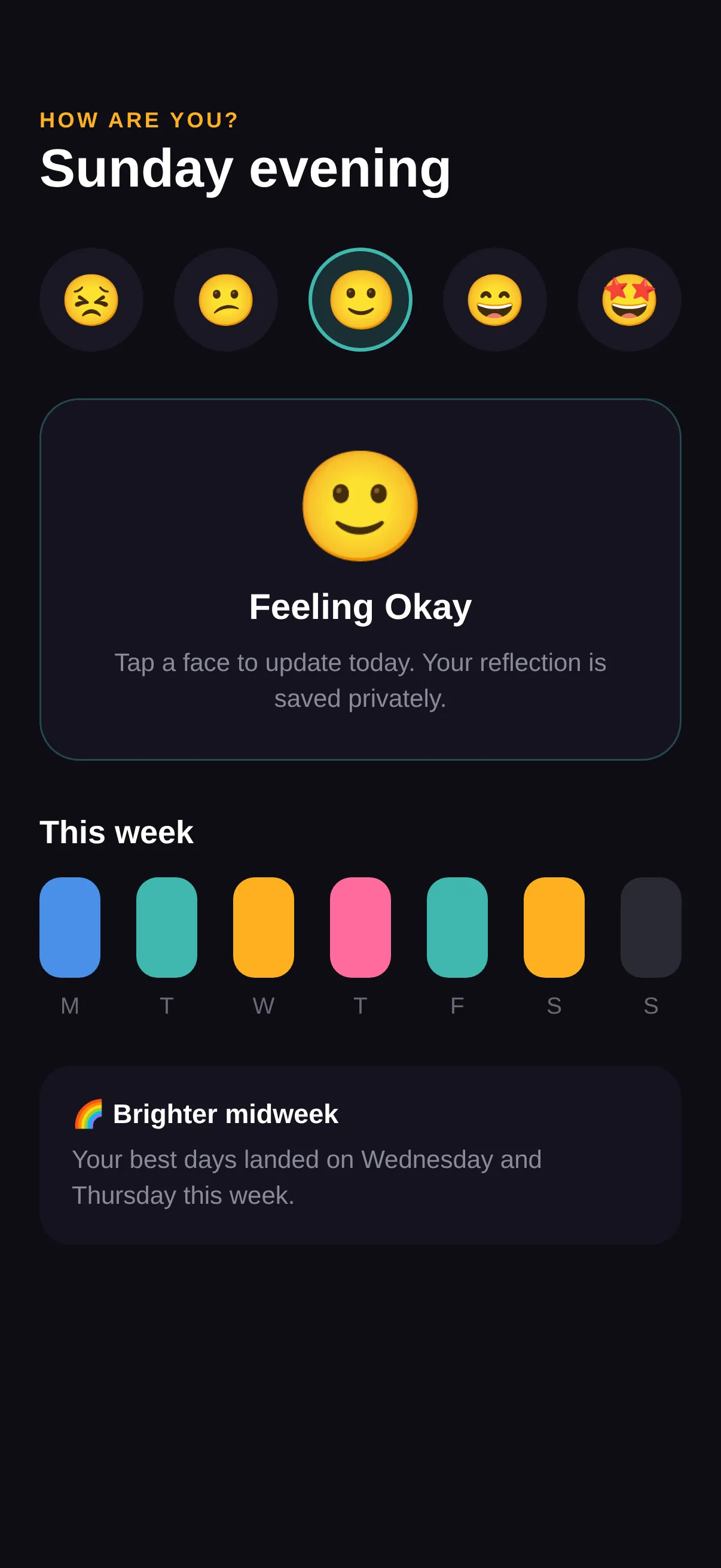
Code · 1 file
React Nativeimport React, { useState } from 'react';
import { View, Text, Pressable, ScrollView, StyleSheet, SafeAreaView } from 'react-native';
const MOODS = [
{ key: 'rough', face: '😣', color: '#7C5CFF' },
{ key: 'meh', face: '😕', color: '#4A8FE7' },
{ key: 'okay', face: '🙂', color: '#3FB8AF' },
{ key: 'good', face: '😄', color: '#FFB020' },
{ key: 'great', face: '🤩', color: '#FF6B9D' },
];
const WEEK = [
{ d: 'M', c: '#4A8FE7' }, { d: 'T', c: '#3FB8AF' }, { d: 'W', c: '#FFB020' },
{ d: 'T', c: '#FF6B9D' }, { d: 'F', c: '#3FB8AF' }, { d: 'S', c: '#FFB020' }, { d: 'S', c: '#2A2A33' },
];
export default function App() {
const [sel, setSel] = useState('okay');
const chosen = MOODS.find((m) => m.key === sel)!;
return (
<SafeAreaView style={s.safe}>
<ScrollView contentContainerStyle={s.scroll} showsVerticalScrollIndicator={false}>
<Text style={s.kicker}>HOW ARE YOU?</Text>
<Text style={s.h1}>Sunday evening</Text>
<View style={s.moodRow}>
{MOODS.map((m) => {
const on = m.key === sel;
return (
<Pressable key={m.key} onPress={() => setSel(m.key)} style={[s.mood, on && { backgroundColor: m.color + '33', borderColor: m.color }]}>
<Text style={[s.face, on && { transform: [{ scale: 1.15 }] }]}>{m.face}</Text>
</Pressable>
);
})}
</View>
<View style={[s.card, { borderColor: chosen.color + '55' }]}>
<Text style={[s.cardBig, { color: chosen.color }]}>{chosen.face}</Text>
<Text style={s.cardLabel}>Feeling {sel}</Text>
<Text style={s.cardNote}>Tap a face to update today. Your reflection is saved privately.</Text>
</View>
<Text style={s.section}>This week</Text>
<View style={s.week}>
{WEEK.map((w, i) => (
<View key={i} style={s.dayCol}>
<View style={[s.daySwatch, { backgroundColor: w.c }]} />
<Text style={s.dayLabel}>{w.d}</Text>
</View>
))}
</View>
<View style={s.insight}>
<Text style={s.insightTitle}>🌈 Brighter midweek</Text>
<Text style={s.insightBody}>Your best days landed on Wednesday and Thursday this week.</Text>
</View>
</ScrollView>
</SafeAreaView>
);
}
const s = StyleSheet.create({
safe: { flex: 1, backgroundColor: '#0E0D14' },
scroll: { padding: 22, paddingTop: 60 },
kicker: { color: '#FFB020', fontSize: 12, fontWeight: '700', letterSpacing: 1.5 },
h1: { color: '#fff', fontSize: 30, fontWeight: '800', marginTop: 4 },
moodRow: { flexDirection: 'row', justifyContent: 'space-between', marginTop: 26 },
mood: { width: 58, height: 58, borderRadius: 29, backgroundColor: '#191824', borderWidth: 2, borderColor: 'transparent', alignItems: 'center', justifyContent: 'center' },
face: { fontSize: 28 },
card: { backgroundColor: '#15131F', borderRadius: 22, borderWidth: 1, padding: 24, marginTop: 26, alignItems: 'center' },
cardBig: { fontSize: 60 },
cardLabel: { color: '#fff', fontSize: 20, fontWeight: '700', marginTop: 10, textTransform: 'capitalize' },
cardNote: { color: '#8A8A99', fontSize: 14, textAlign: 'center', marginTop: 8, lineHeight: 20 },
section: { color: '#fff', fontSize: 18, fontWeight: '700', marginTop: 30, marginBottom: 14 },
week: { flexDirection: 'row', justifyContent: 'space-between' },
dayCol: { alignItems: 'center' },
daySwatch: { width: 34, height: 56, borderRadius: 12 },
dayLabel: { color: '#6A6A78', fontSize: 13, marginTop: 8 },
insight: { backgroundColor: '#15131F', borderRadius: 18, padding: 18, marginTop: 26 },
insightTitle: { color: '#fff', fontSize: 15, fontWeight: '700' },
insightBody: { color: '#8A8A99', fontSize: 14, marginTop: 6, lineHeight: 20 },
});
Machine endpoints
- Manifest (JSON):/designs/tide-mood-journal/manifest
- Registry alias:/r/tide-mood-journal.json
- File tree:/designs/tide-mood-journal/files
- Download bundle (.zip):/designs/tide-mood-journal/bundle.zip
- Bundle JSON Schema:/schema/vp0-bundle.v1.json
- Registry index (all designs):/registry.json
Open, CORS-enabled, no key. React Native is the default target; append ?target=swiftui where SwiftUI is available.