📱 iOS app UI starter. Paste the design link below into Claude Code, Rork, Lovable, or your AI app builder and ask it to start from this design. These are UI starters. Add your own backend/data logic.
Human and curious? This structured page is what coding agents read. See how the whole flow works →
Pulse — Habit Ring
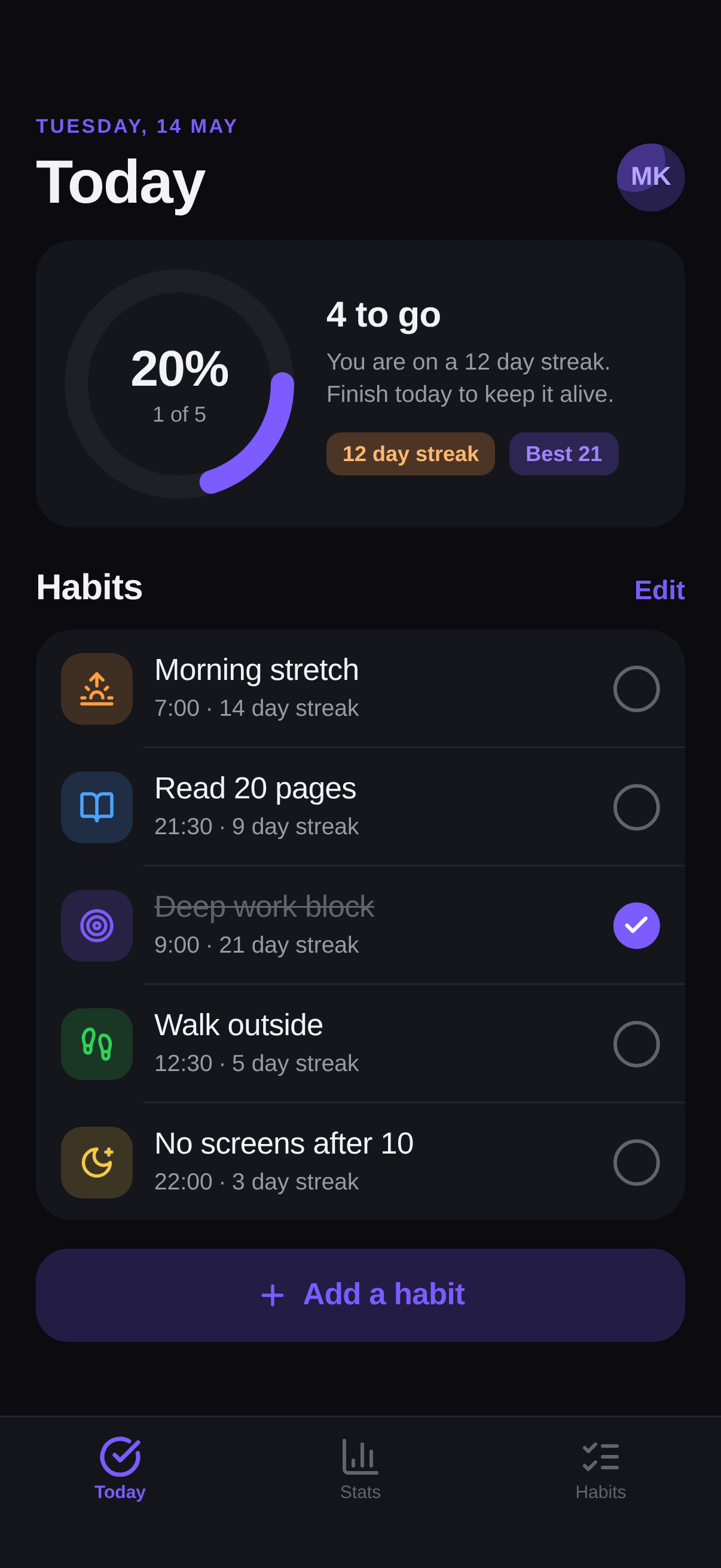
A calm habit tracker with a daily completion ring, weekly stats and per-habit streak calendars. Tap a habit to complete it; open one for its 28-day history.
#Dark #Habit Tracking #Minimal
https://vp0.com/source/pulse-habit-ringnpx vp0com add pulse-habit-ring --target react-nativeOr skip the paste
Install the free VP0 MCP once and your AI builder can search and import any design by name, with no link to copy and no API key.
claude mcp add vp0 -- npx -y vp0-mcp{
"mcpServers": {
"vp0": { "command": "npx", "args": ["-y", "vp0-mcp"] }
}
}Use with AI
Build this iOS app design in my project: "Pulse — Habit Ring" — A calm habit tracker with a daily completion ring, weekly stats and per-habit streak calendars. Tap a habit to complete it; open one for its 28-day history.. 1. Fetch https://api.vp0.com/designs/pulse-habit-ring/manifest — a JSON manifest whose files[] array contains EVERY source file inline (path + content). 2. Create each file at its exact files[].path and paste its content VERBATIM. Do not re-imagine or restyle the UI — the provided code IS the design. 3. Install dependencies exactly as given by the manifest's installCommand field (skip if null). 4. Render the entry component (targets[].entrypoint) from a screen. Keep SafeAreaView / safe-area insets and the existing styling untouched. 5. It is a UI starter: once it renders pixel-perfect, wire my own data, navigation and backend on top. Human-readable source page: https://vp0.com/source/pulse-habit-ring
This is an iOS app UI starter for Expo React Native ("Pulse — Habit Ring").
Integrate it into the user's Expo project as follows:
1. No extra dependencies are required.
2. Create the following file(s) and paste each provided "content" exactly:
   - App.tsx
   - ui/kit.tsx
   - HabitRingView.swift
3. Render the exported component from a screen (e.g. app/(tabs)/index.tsx). It targets iOS — keep SafeAreaView / safe-area insets and the existing styling.
4. These are UI starters: reproduce the visual layout faithfully, then wire the user's own data/navigation/backend afterward.
Paste-ready prompts per builder
Claude Code
Build this iOS app design in my project.
If the vp0 MCP server is connected, use its tools to import "pulse-habit-ring" directly. Otherwise run `npx vp0com add pulse-habit-ring --target react-native`, or follow the steps below.
1. Fetch https://api.vp0.com/r/pulse-habit-ring.json: a JSON manifest whose files[] array contains EVERY source file inline (path + content).
2. Create each file at its exact files[].path and paste its content VERBATIM. Do not re-imagine or restyle the UI: the provided code IS the design.
3. Install dependencies exactly as given by the manifest's installCommand field (skip if null).
4. Render the entry component (targets[].entrypoint) from a screen. Keep SafeAreaView / safe-area insets and the existing styling untouched.
5. It is a UI starter: once it renders pixel-perfect, wire my own data, navigation and backend on top.
Human-readable source page: https://vp0.com/source/pulse-habit-ring
Cursor
Build this iOS app design in my project.
In agent mode, run `npx vp0com add pulse-habit-ring --target react-native` in the terminal, or follow the steps below.
1. Fetch https://api.vp0.com/r/pulse-habit-ring.json: a JSON manifest whose files[] array contains EVERY source file inline (path + content).
2. Create each file at its exact files[].path and paste its content VERBATIM. Do not re-imagine or restyle the UI: the provided code IS the design.
3. Install dependencies exactly as given by the manifest's installCommand field (skip if null).
4. Render the entry component (targets[].entrypoint) from a screen. Keep SafeAreaView / safe-area insets and the existing styling untouched.
5. It is a UI starter: once it renders pixel-perfect, wire my own data, navigation and backend on top.
Human-readable source page: https://vp0.com/source/pulse-habit-ring
Rork
Build this iOS app design in my project. It is React Native (Expo-compatible), so use the files as-is.
1. Fetch https://api.vp0.com/r/pulse-habit-ring.json: a JSON manifest whose files[] array contains EVERY source file inline (path + content).
2. Create each file at its exact files[].path and paste its content VERBATIM. Do not re-imagine or restyle the UI: the provided code IS the design.
3. Install dependencies exactly as given by the manifest's installCommand field (skip if null).
4. Render the entry component (targets[].entrypoint) from a screen. Keep SafeAreaView / safe-area insets and the existing styling untouched.
5. It is a UI starter: once it renders pixel-perfect, wire my own data, navigation and backend on top.
Human-readable source page: https://vp0.com/source/pulse-habit-ring
Lovable
Build this iOS app design in my project. The source is React Native (Expo-compatible); if your stack differs, recreate every screen faithfully: keep layout, spacing, colors and typography exactly as in the code.
1. Fetch https://api.vp0.com/r/pulse-habit-ring.json: a JSON manifest whose files[] array contains EVERY source file inline (path + content).
2. Create each file at its exact files[].path and paste its content VERBATIM. Do not re-imagine or restyle the UI: the provided code IS the design.
3. Install dependencies exactly as given by the manifest's installCommand field (skip if null).
4. Render the entry component (targets[].entrypoint) from a screen. Keep SafeAreaView / safe-area insets and the existing styling untouched.
5. It is a UI starter: once it renders pixel-perfect, wire my own data, navigation and backend on top.
Human-readable source page: https://vp0.com/source/pulse-habit-ring
v0 by Vercel
Recreate this iOS app design. The manifest below contains every source file; keep layout, spacing, colors and typography exactly as in the code.
1. Fetch https://api.vp0.com/r/pulse-habit-ring.json: a JSON manifest whose files[] array contains EVERY source file inline (path + content).
2. Create each file at its exact files[].path and paste its content VERBATIM. Do not re-imagine or restyle the UI: the provided code IS the design.
3. Install dependencies exactly as given by the manifest's installCommand field (skip if null).
4. Render the entry component (targets[].entrypoint) from a screen. Keep SafeAreaView / safe-area insets and the existing styling untouched.
5. It is a UI starter: once it renders pixel-perfect, wire my own data, navigation and backend on top.
Human-readable source page: https://vp0.com/source/pulse-habit-ring
Bolt
Build this iOS app design in my project. The source is React Native (Expo-compatible); if your stack differs, recreate every screen faithfully: keep layout, spacing, colors and typography exactly as in the code.
1. Fetch https://api.vp0.com/r/pulse-habit-ring.json: a JSON manifest whose files[] array contains EVERY source file inline (path + content).
2. Create each file at its exact files[].path and paste its content VERBATIM. Do not re-imagine or restyle the UI: the provided code IS the design.
3. Install dependencies exactly as given by the manifest's installCommand field (skip if null).
4. Render the entry component (targets[].entrypoint) from a screen. Keep SafeAreaView / safe-area insets and the existing styling untouched.
5. It is a UI starter: once it renders pixel-perfect, wire my own data, navigation and backend on top.
Human-readable source page: https://vp0.com/source/pulse-habit-ring
Replit
Build this iOS app design in my project. The source is React Native (Expo-compatible); if your stack differs, recreate every screen faithfully: keep layout, spacing, colors and typography exactly as in the code.
1. Fetch https://api.vp0.com/r/pulse-habit-ring.json: a JSON manifest whose files[] array contains EVERY source file inline (path + content).
2. Create each file at its exact files[].path and paste its content VERBATIM. Do not re-imagine or restyle the UI: the provided code IS the design.
3. Install dependencies exactly as given by the manifest's installCommand field (skip if null).
4. Render the entry component (targets[].entrypoint) from a screen. Keep SafeAreaView / safe-area insets and the existing styling untouched.
5. It is a UI starter: once it renders pixel-perfect, wire my own data, navigation and backend on top.
Human-readable source page: https://vp0.com/source/pulse-habit-ring
Preview
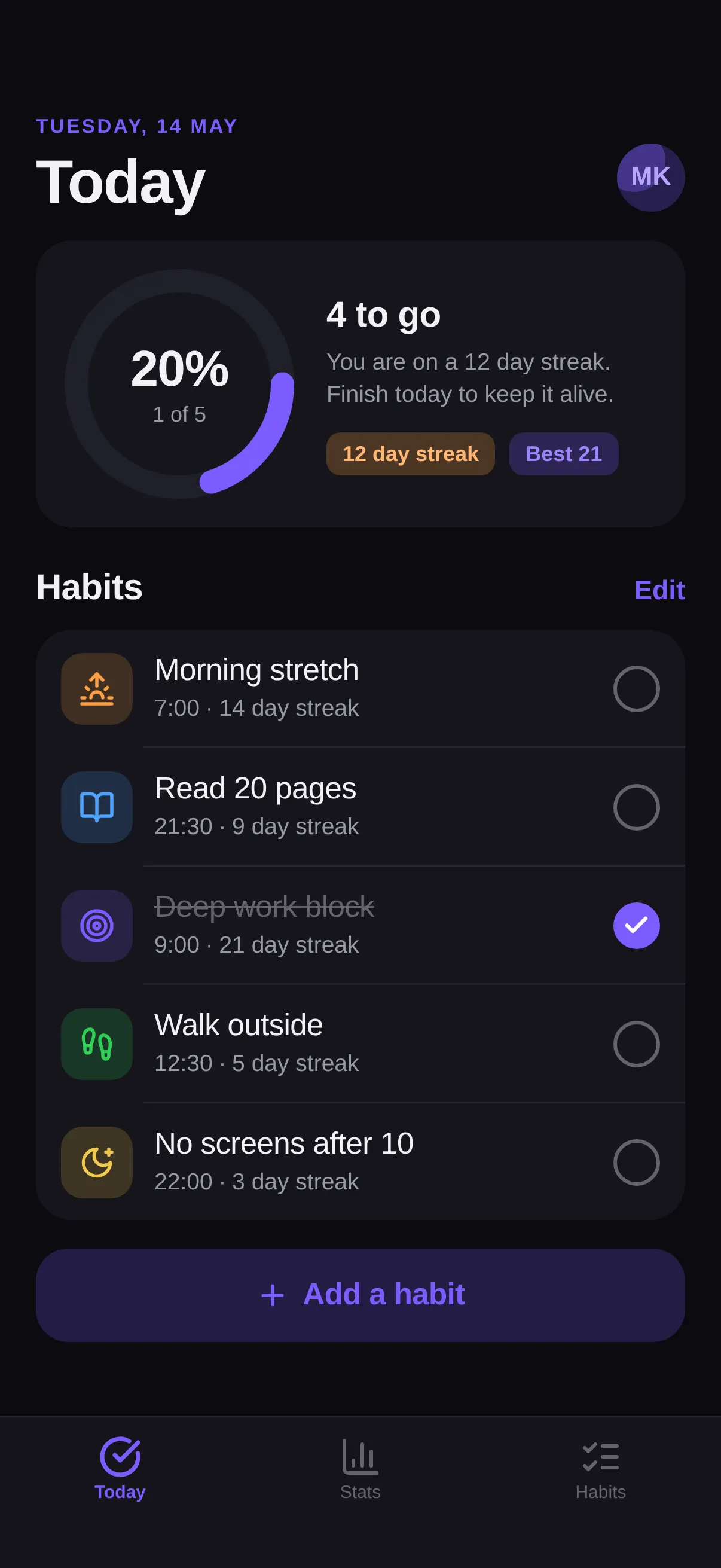
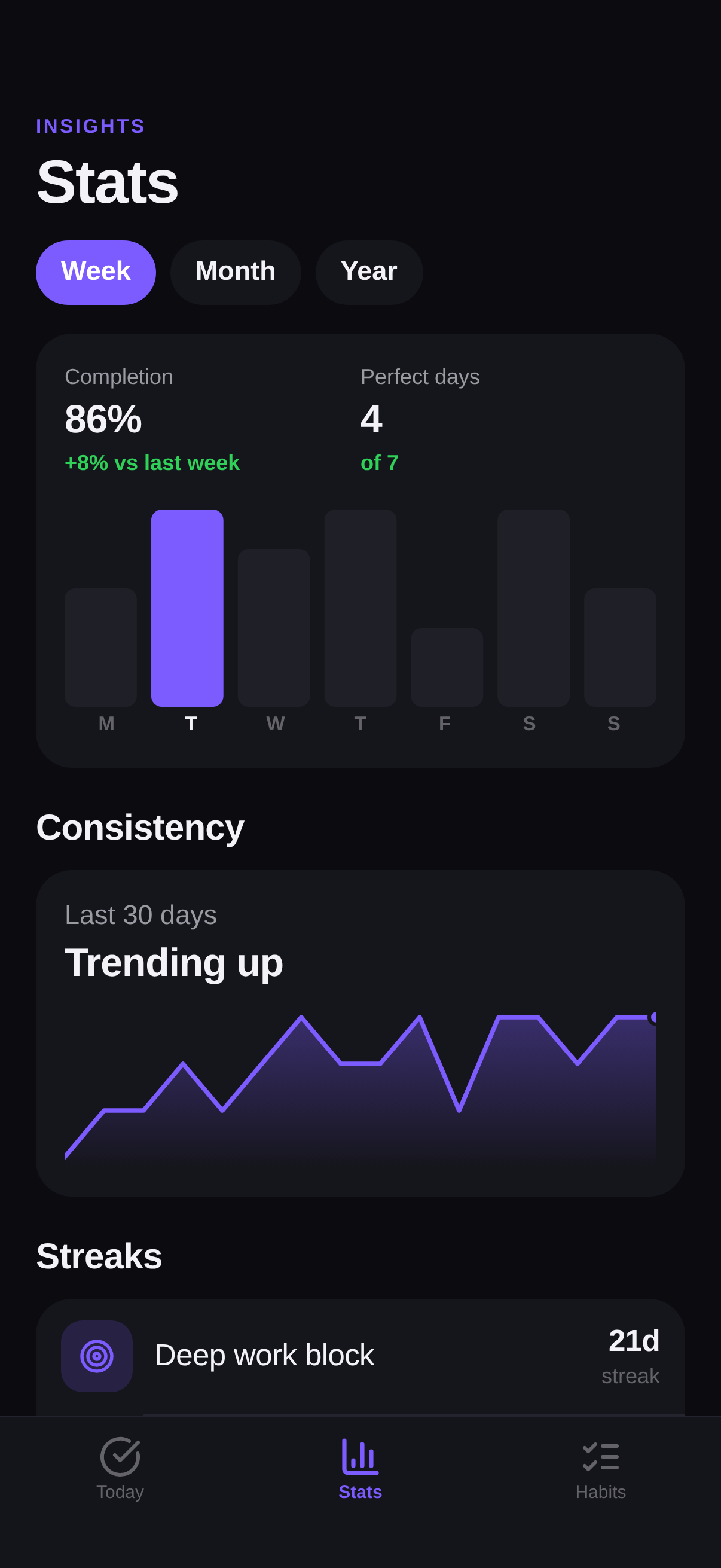
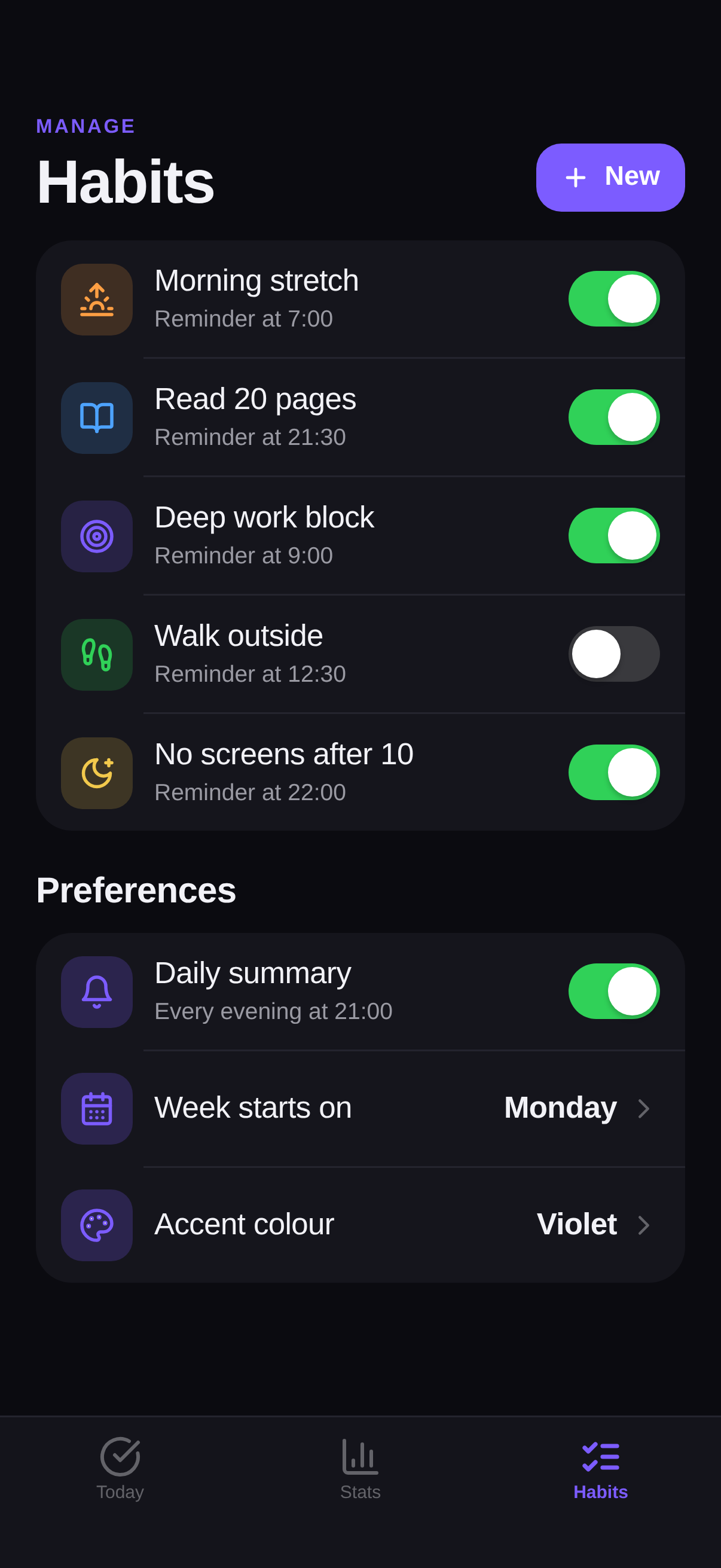
Code · 2 files
import React, { useState, createContext, useContext } from 'react';
import { View, Text } from 'react-native';
import { ThemeProvider, useT, T, Screen, Scroll, Header, NavBar, Card, Group, Row, Button, Chip, Pill, Checkbox, Toggle, Ring, Bars, Spark, Stat, Avatar, TabBar, Tabs, Stack, Icon, Spacer, SectionTitle } from './ui/kit';

const ACCENT = '#7C5CFF';
const THEME = { dark: { bg: '#0B0B10', card: '#15151C', card2: '#1F1F28', line: '#24242E' }, light: { bg: '#F4F3FA' } };

const HABITS = [
  { id: 1, name: 'Morning stretch', icon: 'Sunrise', color: '#FF9F43', streak: 14, time: '7:00', days: [1,1,1,0,1,1,1,1,1,1,0,1,1,1,1,1,1,1,0,1,1,1,1,1,1,1,1,1] },
  { id: 2, name: 'Read 20 pages', icon: 'BookOpen', color: '#4DA3FF', streak: 9, time: '21:30', days: [1,0,1,1,1,0,1,1,1,1,1,0,1,1,1,1,0,1,1,1,1,1,1,1,1,1,1,1] },
  { id: 3, name: 'Deep work block', icon: 'Target', color: '#7C5CFF', streak: 21, time: '9:00', days: [1,1,1,1,1,1,1,0,1,1,1,1,1,1,1,1,1,1,1,1,1,1,1,1,1,1,1,1] },
  { id: 4, name: 'Walk outside', icon: 'Footprints', color: '#30D158', streak: 5, time: '12:30', days: [0,1,1,0,1,0,1,1,0,1,1,1,0,1,0,1,1,1,0,1,1,0,1,1,1,1,1,1] },
  { id: 5, name: 'No screens after 10', icon: 'MoonStar', color: '#F2C94C', streak: 3, time: '22:00', days: [1,0,0,1,0,1,0,1,0,0,1,0,1,1,0,1,0,0,1,0,1,1,0,1,0,1,1,1] },
];
const WEEK = [3, 5, 4, 5, 2, 5, 3];
const DAYS = ['M', 'T', 'W', 'T', 'F', 'S', 'S'];
const Done = createContext([{}, () => {}]);

function TodayScreen({ nav }) {
  const t = useT();
  const [done, setDone] = useContext(Done);
  const completed = HABITS.filter((h) => done[h.id]).length;
  const pct = completed / HABITS.length;
  return (
    <Scroll pad={0}>
      <Header kicker="Tuesday, 14 May" title="Today" right={<Avatar name="Maya K" size={38} />} />
      <View style={{ paddingHorizontal: 20 }}>
        <Card style={{ flexDirection: 'row', alignItems: 'center', gap: 18 }} onPress={() => nav.push('week')}>
          <Ring progress={pct} size={128} stroke={13}>
            <Text style={[T.title1, T.num, { color: t.text }]}>{Math.round(pct * 100)}%</Text>
            <Text style={[T.caption, { color: t.text2 }]}>{completed} of {HABITS.length}</Text>
          </Ring>
          <View style={{ flex: 1 }}>
            <Text style={[T.title3, { color: t.text }]}>{completed === HABITS.length ? 'All done. Rest well.' : (HABITS.length - completed) + ' to go'}</Text>
            <Text style={[T.footnote, { color: t.text2, marginTop: 4 }]}>You are on a 12 day streak. Finish today to keep it alive.</Text>
            <View style={{ flexDirection: 'row', gap: 8, marginTop: 12 }}>
              <Pill label="12 day streak" color="#FF9F43" />
              <Pill label="Best 21" color={ACCENT} />
            </View>
          </View>
        </Card>
        <SectionTitle title="Habits" action="Edit" onAction={() => {}} />
        <Group>
          {HABITS.map((h) => (
            <Row
              key={h.id}
              icon={h.icon}
              iconColor={h.color}
              iconBg={t.isDark ? h.color + '2E' : h.color + '22'}
              title={h.name}
              subtitle={h.time + '  ·  ' + h.streak + ' day streak'}
              titleStyle={done[h.id] ? { color: t.text3, textDecorationLine: 'line-through' } : null}
              onPress={() => nav.push('habit', { id: h.id })}
              right={<Checkbox checked={!!done[h.id]} color={h.color} onChange={() => setDone((d) => Object.assign({}, d, { [h.id]: !d[h.id] }))} />}
            />
          ))}
        </Group>
        <Spacer h={16} />
        <Button label="Add a habit" icon="Plus" kind="soft" full onPress={() => {}} />
      </View>
    </Scroll>
  );
}

function StatsScreen() {
  const t = useT();
  const [range, setRange] = useState('week');
  return (
    <Scroll pad={0}>
      <Header kicker="Insights" title="Stats" />
      <View style={{ paddingHorizontal: 20 }}>
        <View style={{ flexDirection: 'row', gap: 8, marginBottom: 16 }}>
          <Chip label="Week" active={range === 'week'} onPress={() => setRange('week')} />
          <Chip label="Month" active={range === 'month'} onPress={() => setRange('month')} />
          <Chip label="Year" active={range === 'year'} onPress={() => setRange('year')} />
        </View>
        <Card>
          <View style={{ flexDirection: 'row' }}>
            <Stat label="Completion" value="86%" delta="+8% vs last week" />
            <Stat label="Perfect days" value="4" delta="of 7" up />
          </View>
          <Spacer h={18} />
          <Bars values={WEEK} max={5} labels={DAYS} height={110} highlight={1} />
        </Card>
        <SectionTitle title="Consistency" />
        <Card>
          <Text style={[T.subhead, { color: t.text2 }]}>Last 30 days</Text>
          <Text style={[T.title2, T.num, { color: t.text, marginTop: 2 }]}>Trending up</Text>
          <Spark values={[2, 3, 3, 4, 3, 4, 5, 4, 4, 5, 3, 5, 5, 4, 5, 5]} height={90} style={{ marginTop: 10 }} />
        </Card>
        <SectionTitle title="Streaks" />
        <Group>
          {HABITS.slice().sort((a, b) => b.streak - a.streak).map((h) => (
            <Row key={h.id} icon={h.icon} iconColor={h.color} iconBg={t.isDark ? h.color + '2E' : h.color + '22'} title={h.name} value={h.streak + 'd'} sub2="streak" />
          ))}
        </Group>
      </View>
    </Scroll>
  );
}

function HabitsScreen({ nav }) {
  const t = useT();
  const [remind, setRemind] = useState({ 1: true, 2: true, 3: true, 4: false, 5: true });
  return (
    <Scroll pad={0}>
      <Header kicker="Manage" title="Habits" right={<Button label="New" icon="Plus" small onPress={() => {}} />} />
      <View style={{ paddingHorizontal: 20 }}>
        <Group>
          {HABITS.map((h) => (
            <Row key={h.id} icon={h.icon} iconColor={h.color} iconBg={t.isDark ? h.color + '2E' : h.color + '22'} title={h.name} subtitle={'Reminder at ' + h.time} onPress={() => nav.push('habit', { id: h.id })} right={<Toggle value={!!remind[h.id]} onChange={(v) => setRemind((r) => Object.assign({}, r, { [h.id]: v }))} />} />
          ))}
        </Group>
        <SectionTitle title="Preferences" />
        <Group>
          <Row icon="Bell" title="Daily summary" subtitle="Every evening at 21:00" right={<Toggle value onChange={() => {}} />} />
          <Row icon="CalendarDays" title="Week starts on" value="Monday" chevron onPress={() => {}} />
          <Row icon="Palette" title="Accent colour" value="Violet" chevron onPress={() => {}} />
        </Group>
      </View>
    </Scroll>
  );
}

function HabitDetail({ nav, params }) {
  const t = useT();
  const [done, setDone] = useContext(Done);
  const h = HABITS.find((x) => x.id === params.id) || HABITS[0];
  const rate = h.days.filter(Boolean).length / h.days.length;
  const isDone = !!done[h.id];
  return (
    <Screen>
      <NavBar title={h.name} onBack={nav.pop} right={<Icon name="Ellipsis" size={22} />} />
      <Scroll pad={20}>
        <View style={{ alignItems: 'center', marginTop: 8 }}>
          <Ring progress={rate} size={170} stroke={16} color={h.color}>
            <Icon name={h.icon} size={34} color={h.color} strokeWidth={2.2} />
            <Text style={[T.title2, T.num, { color: t.text, marginTop: 6 }]}>{Math.round(rate * 100)}%</Text>
          </Ring>
          <Text style={[T.subhead, { color: t.text2, marginTop: 12 }]}>completed over the last 28 days</Text>
        </View>
        <View style={{ flexDirection: 'row', gap: 12, marginTop: 20 }}>
          <Card style={{ flex: 1 }}><Stat label="Current streak" value={h.streak + ' days'} /></Card>
          <Card style={{ flex: 1 }}><Stat label="Reminder" value={h.time} /></Card>
        </View>
        <SectionTitle title="Last 4 weeks" />
        <Card>
          <View style={{ flexDirection: 'row', flexWrap: 'wrap', gap: 8, justifyContent: 'space-between' }}>
            {h.days.map((d, i) => (
              <View key={i} style={{ width: 34, height: 34, borderRadius: 10, backgroundColor: d ? h.color : t.card2, alignItems: 'center', justifyContent: 'center', opacity: d ? 1 : 0.9 }}>
                {d ? <Icon name="Check" size={16} color="#fff" strokeWidth={3} /> : null}
              </View>
            ))}
          </View>
        </Card>
        <Spacer h={20} />
        <Button label={isDone ? 'Completed today' : 'Mark as done'} icon={isDone ? 'Check' : 'Circle'} color={h.color} full onPress={() => setDone((d) => Object.assign({}, d, { [h.id]: !d[h.id] }))} />
      </Scroll>
    </Screen>
  );
}

function WeekDetail({ nav }) {
  const t = useT();
  return (
    <Screen>
      <NavBar title="This week" onBack={nav.pop} />
      <Scroll pad={20}>
        <Card>
          <Text style={[T.subhead, { color: t.text2 }]}>Completed habits</Text>
          <Text style={[T.largeTitle, T.num, { color: t.text }]}>27 <Text style={[T.title3, { color: t.text2 }]}>of 35</Text></Text>
          <Bars values={WEEK} max={5} labels={DAYS} height={140} highlight={1} style={{ marginTop: 14 }} />
        </Card>
        <SectionTitle title="By habit" />
        <Group>
          {HABITS.map((h) => (
            <Row key={h.id} icon={h.icon} iconColor={h.color} iconBg={t.isDark ? h.color + '2E' : h.color + '22'} title={h.name} value={Math.round(h.days.slice(-7).filter(Boolean).length) + '/7'} />
          ))}
        </Group>
      </Scroll>
    </Screen>
  );
}

function Root({ nav }) {
  const [tab, setTab] = useState('today');
  return (
    <Screen>
      <Tabs active={tab} screens={{ today: <TodayScreen nav={nav} />, stats: <StatsScreen />, habits: <HabitsScreen nav={nav} /> }} />
      <TabBar
        active={tab}
        onChange={setTab}
        tabs={[
          { key: 'today', label: 'Today', icon: 'CircleCheckBig' },
          { key: 'stats', label: 'Stats', icon: 'ChartColumn' },
          { key: 'habits', label: 'Habits', icon: 'ListChecks' },
        ]}
      />
    </Screen>
  );
}

const SCREENS = { root: Root, habit: HabitDetail, week: WeekDetail };

export default function App() {
  const state = useState({ 3: true });
  return (
    <ThemeProvider accent={ACCENT} overrides={THEME}>
      <Done.Provider value={state}>
        <Stack screens={SCREENS} initial="root" />
      </Done.Provider>
    </ThemeProvider>
  );
}
import React, { useState, useEffect, useRef, useMemo, createContext, useContext } from 'react';
import { View, Text, Pressable, ScrollView, StyleSheet, Animated, Easing, Modal, Dimensions, useColorScheme, TextInput } from 'react-native';
import { useSafeAreaInsets } from 'react-native-safe-area-context';
import Svg, { Circle, Path, Rect, Line, Polyline, Defs, LinearGradient as SvgGradient, Stop } from 'react-native-svg';
import * as Lucide from 'lucide-react-native';
import { LinearGradient } from 'expo-linear-gradient';

// ─── colour helpers ─────────────────────────────────────────────────────────
export function alpha(hex, a) {
  const h = hex.replace('#', '');
  const n = parseInt(h.length === 3 ? h.split('').map((c) => c + c).join('') : h, 16);
  const r = (n >> 16) & 255, g = (n >> 8) & 255, b = n & 255;
  return 'rgba(' + r + ',' + g + ',' + b + ',' + a + ')';
}
export function mix(hexA, hexB, p) {
  const pa = parseInt(hexA.replace('#', ''), 16), pb = parseInt(hexB.replace('#', ''), 16);
  const ch = (sh) => Math.round(((pa >> sh) & 255) * (1 - p) + ((pb >> sh) & 255) * p);
  const to = (v) => ('0' + v.toString(16)).slice(-2);
  return '#' + to(ch(16)) + to(ch(8)) + to(ch(0));
}
function luminance(hex) {
  const n = parseInt(hex.replace('#', ''), 16);
  const r = (n >> 16) & 255, g = (n >> 8) & 255, b = n & 255;
  return (0.2126 * r + 0.7152 * g + 0.0722 * b) / 255;
}

// ─── theme ──────────────────────────────────────────────────────────────────
const DARK = { bg: '#000000', card: '#1C1C1E', card2: '#2C2C2E', text: '#F2F2F7', text2: '#9A9AA3', text3: '#636369', line: '#2A2A2E' };
const LIGHT = { bg: '#F2F2F7', card: '#FFFFFF', card2: '#EDEDF2', text: '#111114', text2: '#6E6E76', text3: '#A6A6AE', line: '#E3E3E8' };
const SEMANTIC = { success: '#30D158', warning: '#FFB340', danger: '#FF453A', info: '#4DA3FF' };
const ThemeCtx = createContext(null);

export function makeTheme(accent, isDark, overrides) {
  const base = isDark ? DARK : LIGHT;
  const o = (overrides && (isDark ? overrides.dark : overrides.light)) || {};
  const t = Object.assign({}, base, SEMANTIC, o, { accent: accent, isDark: isDark });
  t.onAccent = luminance(accent) > 0.6 ? '#0B0B10' : '#FFFFFF';
  t.accentSoft = alpha(accent, isDark ? 0.22 : 0.14);
  t.accentFaint = alpha(accent, isDark ? 0.12 : 0.08);
  return t;
}
export function ThemeProvider({ accent, overrides, children }) {
  const scheme = useColorScheme();
  const t = useMemo(() => makeTheme(accent, scheme !== 'light', overrides), [accent, scheme, overrides]);
  return <ThemeCtx.Provider value={t}>{children}</ThemeCtx.Provider>;
}
export function useT() {
  const t = useContext(ThemeCtx);
  return t || makeTheme('#7C5CFF', true, null);
}
export const useInsets = useSafeAreaInsets;
export const win = () => Dimensions.get('window');

// ─── type scale (iOS) ───────────────────────────────────────────────────────
export const T = StyleSheet.create({
  largeTitle: { fontSize: 34, fontWeight: '700', letterSpacing: -0.7, lineHeight: 40 },
  title1: { fontSize: 28, fontWeight: '700', letterSpacing: -0.5, lineHeight: 34 },
  title2: { fontSize: 22, fontWeight: '700', letterSpacing: -0.35, lineHeight: 28 },
  title3: { fontSize: 20, fontWeight: '600', letterSpacing: -0.25, lineHeight: 25 },
  headline: { fontSize: 17, fontWeight: '600', letterSpacing: -0.2, lineHeight: 22 },
  body: { fontSize: 17, fontWeight: '400', letterSpacing: -0.2, lineHeight: 22 },
  callout: { fontSize: 16, fontWeight: '400', lineHeight: 21 },
  subhead: { fontSize: 15, fontWeight: '400', lineHeight: 20 },
  footnote: { fontSize: 13, fontWeight: '400', lineHeight: 18 },
  caption: { fontSize: 12, fontWeight: '500', lineHeight: 16 },
  caption2: { fontSize: 11, fontWeight: '600', lineHeight: 13, letterSpacing: 0.3 },
  num: { fontVariant: ['tabular-nums'] },
});

// ─── motion ─────────────────────────────────────────────────────────────────
export function useTween(target, ms) {
  const dur = ms || 650;
  const [v, setV] = useState(target);
  const ref = useRef({ raf: 0 });
  useEffect(() => {
    const from = v, to = target, t0 = Date.now();
    if (from === to) return;
    cancelAnimationFrame(ref.current.raf);
    const tick = () => {
      const p = Math.min(1, (Date.now() - t0) / dur);
      const e = 1 - Math.pow(1 - p, 3);
      setV(from + (to - from) * e);
      if (p < 1) ref.current.raf = requestAnimationFrame(tick);
    };
    ref.current.raf = requestAnimationFrame(tick);
    return () => cancelAnimationFrame(ref.current.raf);
  }, [target]);
  return v;
}
export function usePressScale(to) {
  const scale = useRef(new Animated.Value(1)).current;
  const onPressIn = () => Animated.spring(scale, { toValue: to || 0.96, useNativeDriver: false, speed: 40, bounciness: 2 }).start();
  const onPressOut = () => Animated.spring(scale, { toValue: 1, useNativeDriver: false, speed: 20, bounciness: 8 }).start();
  return { scale, onPressIn, onPressOut };
}

// ─── icons ──────────────────────────────────────────────────────────────────
export function Icon({ name, size, color, strokeWidth, fill, style }) {
  const t = useT();
  const Cmp = Lucide[name] || Lucide.Circle;
  return <Cmp size={size || 22} color={color || t.text} strokeWidth={strokeWidth || 2} fill={fill || 'none'} style={style} />;
}

// ─── layout primitives ──────────────────────────────────────────────────────
export function Screen({ children, style, bg }) {
  const t = useT();
  return <View style={[{ flex: 1, backgroundColor: bg || t.bg }, style]}>{children}</View>;
}
export function Scroll({ children, style, contentStyle, pad, horizontal, bottom }) {
  const p = pad == null ? 20 : pad;
  return (
    <ScrollView
      horizontal={!!horizontal}
      style={[{ flex: 1 }, style]}
      showsVerticalScrollIndicator={false}
      showsHorizontalScrollIndicator={false}
      contentContainerStyle={[horizontal ? { paddingHorizontal: p, gap: 12 } : { paddingHorizontal: p, paddingBottom: bottom == null ? 28 : bottom }, contentStyle]}
    >
      {children}
    </ScrollView>
  );
}
export function Spacer({ h, w }) { return <View style={{ height: h || 0, width: w || 0 }} />; }
export function Divider({ inset, style }) {
  const t = useT();
  return <View style={[{ height: StyleSheet.hairlineWidth, backgroundColor: t.line, marginLeft: inset || 0 }, style]} />;
}

/** Large-title header for a tab/root screen: kicker, 34pt title, optional trailing slot. */
export function Header({ kicker, title, subtitle, right, style, kickerColor }) {
  const t = useT();
  const ins = useInsets();
  return (
    <View style={[{ paddingTop: ins.top + 6, paddingHorizontal: 20, paddingBottom: 12, flexDirection: 'row', alignItems: 'flex-end', justifyContent: 'space-between' }, style]}>
      <View style={{ flex: 1, minWidth: 0 }}>
        {kicker ? <Text style={[T.caption2, { color: kickerColor || t.accent, textTransform: 'uppercase', letterSpacing: 1.2, marginBottom: 4 }]}>{kicker}</Text> : null}
        <Text style={[T.largeTitle, { color: t.text }]} numberOfLines={1}>{title}</Text>
        {subtitle ? <Text style={[T.subhead, { color: t.text2, marginTop: 3 }]}>{subtitle}</Text> : null}
      </View>
      {right ? <View style={{ marginLeft: 12, marginBottom: 4 }}>{right}</View> : null}
    </View>
  );
}

/** Inline navigation bar for a pushed screen: back chevron, centred title, trailing slot. */
export function NavBar({ title, onBack, right, transparent, tint }) {
  const t = useT();
  const ins = useInsets();
  const color = tint || t.text;
  return (
    <View style={{ paddingTop: ins.top + 2, height: ins.top + 46, flexDirection: 'row', alignItems: 'center', paddingHorizontal: 8, backgroundColor: transparent ? 'transparent' : t.bg }}>
      <Pressable onPress={onBack} hitSlop={10} style={({ pressed }) => [{ width: 44, height: 40, alignItems: 'center', justifyContent: 'center', borderRadius: 20 }, pressed && { opacity: 0.5 }]}>
        <Icon name="ChevronLeft" size={26} color={color} strokeWidth={2.4} />
      </Pressable>
      <Text style={[T.headline, { color: color, flex: 1, textAlign: 'center' }]} numberOfLines={1}>{title}</Text>
      <View style={{ width: 44, alignItems: 'flex-end' }}>{right || null}</View>
    </View>
  );
}

/** Section label (iOS grouped header) with optional trailing action. */
export function SectionTitle({ title, action, onAction, style }) {
  const t = useT();
  return (
    <View style={[{ flexDirection: 'row', alignItems: 'baseline', justifyContent: 'space-between', marginTop: 22, marginBottom: 10 }, style]}>
      <Text style={[T.title3, { color: t.text }]}>{title}</Text>
      {action ? (
        <Pressable onPress={onAction} hitSlop={8}>
          <Text style={[T.subhead, { color: t.accent, fontWeight: '600' }]}>{action}</Text>
        </Pressable>
      ) : null}
    </View>
  );
}

export function Card({ children, style, onPress, pad, bg }) {
  const t = useT();
  const base = [{ backgroundColor: bg || t.card, borderRadius: 20, padding: pad == null ? 16 : pad }, style];
  if (!onPress) return <View style={base}>{children}</View>;
  return (
    <Pressable onPress={onPress} style={({ pressed }) => [base, pressed && { opacity: 0.86, transform: [{ scale: 0.985 }] }]}>
      {children}
    </Pressable>
  );
}

/** Inset-grouped list: wraps rows in a card, drawing hairline separators. */
export function Group({ children, style }) {
  const t = useT();
  const kids = React.Children.toArray(children).filter(Boolean);
  return (
    <View style={[{ backgroundColor: t.card, borderRadius: 20, overflow: 'hidden' }, style]}>
      {kids.map((k, i) => (
        <View key={i}>
          {k}
          {i < kids.length - 1 ? <Divider inset={60} /> : null}
        </View>
      ))}
    </View>
  );
}

/** A list row: leading icon tile (lucide or emoji/custom), title, subtitle, trailing value, chevron. */
export function Row({ icon, emoji, iconColor, iconBg, leading, title, subtitle, value, valueColor, sub2, chevron, onPress, right, pad, titleStyle }) {
  const t = useT();
  const body = (
    <View style={{ flexDirection: 'row', alignItems: 'center', paddingVertical: pad == null ? 12 : pad, paddingHorizontal: 14 }}>
      {leading ? leading : (icon || emoji) ? (
        <View style={{ width: 40, height: 40, borderRadius: 12, backgroundColor: iconBg || t.accentSoft, alignItems: 'center', justifyContent: 'center' }}>
          {emoji ? <Text style={{ fontSize: 20 }}>{emoji}</Text> : <Icon name={icon} size={20} color={iconColor || t.accent} strokeWidth={2.2} />}
        </View>
      ) : null}
      <View style={{ flex: 1, minWidth: 0, marginLeft: (leading || icon || emoji) ? 12 : 0 }}>
        <Text style={[T.body, { color: t.text, fontWeight: '500' }, titleStyle]} numberOfLines={1}>{title}</Text>
        {subtitle ? <Text style={[T.footnote, { color: t.text2, marginTop: 1 }]} numberOfLines={1}>{subtitle}</Text> : null}
      </View>
      {value != null ? (
        <View style={{ alignItems: 'flex-end', marginLeft: 10 }}>
          <Text style={[T.body, T.num, { color: valueColor || t.text, fontWeight: '600' }]}>{value}</Text>
          {sub2 ? <Text style={[T.caption, { color: t.text3 }]}>{sub2}</Text> : null}
        </View>
      ) : null}
      {right ? <View style={{ marginLeft: 10 }}>{right}</View> : null}
      {chevron ? <Icon name="ChevronRight" size={18} color={t.text3} style={{ marginLeft: 6 }} /> : null}
    </View>
  );
  if (!onPress) return body;
  return <Pressable onPress={onPress} style={({ pressed }) => [pressed && { backgroundColor: t.card2 }]}>{body}</Pressable>;
}

// ─── controls ───────────────────────────────────────────────────────────────
export function Button({ label, onPress, kind, icon, small, full, color, style, disabled }) {
  const t = useT();
  const { scale, onPressIn, onPressOut } = usePressScale(0.96);
  const k = kind || 'primary';
  const accent = color || t.accent;
  const bg = k === 'primary' ? accent : k === 'secondary' ? t.card2 : k === 'soft' ? alpha(accent, t.isDark ? 0.22 : 0.14) : 'transparent';
  const fg = k === 'primary' ? (luminance(accent) > 0.6 ? '#0B0B10' : '#FFFFFF') : k === 'secondary' ? t.text : accent;
  return (
    <Animated.View style={[{ transform: [{ scale }] }, full && { alignSelf: 'stretch' }, style]}>
      <Pressable
        onPress={onPress}
        onPressIn={onPressIn}
        onPressOut={onPressOut}
        disabled={disabled}
        style={{ backgroundColor: bg, borderRadius: small ? 14 : 18, paddingVertical: small ? 9 : 15, paddingHorizontal: small ? 14 : 20, flexDirection: 'row', alignItems: 'center', justifyContent: 'center', gap: 8, opacity: disabled ? 0.5 : 1 }}
      >
        {icon ? <Icon name={icon} size={small ? 16 : 18} color={fg} strokeWidth={2.4} /> : null}
        <Text style={[small ? T.subhead : T.headline, { color: fg, fontWeight: '600' }]}>{label}</Text>
      </Pressable>
    </Animated.View>
  );
}

export function IconButton({ name, onPress, size, bg, color, style }) {
  const t = useT();
  const s = size || 40;
  return (
    <Pressable onPress={onPress} hitSlop={6} style={({ pressed }) => [{ width: s, height: s, borderRadius: s / 2, backgroundColor: bg || t.card2, alignItems: 'center', justifyContent: 'center' }, pressed && { opacity: 0.6 }, style]}>
      <Icon name={name} size={Math.round(s * 0.5)} color={color || t.text} strokeWidth={2.2} />
    </Pressable>
  );
}

export function Chip({ label, active, onPress, icon, color, style }) {
  const t = useT();
  const c = color || t.accent;
  return (
    <Pressable onPress={onPress} style={({ pressed }) => [{ paddingHorizontal: 14, paddingVertical: 8, borderRadius: 999, backgroundColor: active ? c : t.card, flexDirection: 'row', alignItems: 'center', gap: 6 }, pressed && { opacity: 0.7 }, style]}>
      {icon ? <Icon name={icon} size={14} color={active ? (luminance(c) > 0.6 ? '#0B0B10' : '#fff') : t.text2} strokeWidth={2.4} /> : null}
      <Text style={[T.subhead, { color: active ? (luminance(c) > 0.6 ? '#0B0B10' : '#fff') : t.text, fontWeight: '600' }]}>{label}</Text>
    </Pressable>
  );
}

export function Pill({ label, color, style, small }) {
  const t = useT();
  const c = color || t.accent;
  return (
    <View style={[{ alignSelf: 'flex-start', paddingHorizontal: small ? 7 : 9, paddingVertical: small ? 2 : 4, borderRadius: 8, backgroundColor: alpha(c, t.isDark ? 0.24 : 0.14) }, style]}>
      <Text style={[small ? T.caption2 : T.caption, { color: t.isDark ? mix(c, '#FFFFFF', 0.25) : mix(c, '#000000', 0.2), fontWeight: '700' }]}>{label}</Text>
    </View>
  );
}

/** iOS segmented control with a sliding thumb. */
export function Segmented({ options, value, onChange, style }) {
  const t = useT();
  const idx = Math.max(0, options.findIndex((o) => (o.value == null ? o : o.value) === value));
  const x = useRef(new Animated.Value(idx)).current;
  const [w, setW] = useState(0);
  useEffect(() => { Animated.spring(x, { toValue: idx, useNativeDriver: false, speed: 24, bounciness: 4 }).start(); }, [idx]);
  const segW = options.length ? (w - 4) / options.length : 0;
  return (
    <View onLayout={(e) => setW(e.nativeEvent.layout.width)} style={[{ height: 36, borderRadius: 11, backgroundColor: t.isDark ? t.card2 : '#E2E2E8', padding: 2, flexDirection: 'row' }, style]}>
      {w > 0 ? (
        <Animated.View style={{ position: 'absolute', top: 2, left: 2, width: segW, height: 32, borderRadius: 9, backgroundColor: t.isDark ? '#5A5A5F' : '#FFFFFF', transform: [{ translateX: Animated.multiply(x, segW) }], shadowColor: '#000', shadowOpacity: t.isDark ? 0 : 0.12, shadowRadius: 4, shadowOffset: { width: 0, height: 2 } }} />
      ) : null}
      {options.map((o, i) => {
        const v = o.value == null ? o : o.value;
        const label = o.label == null ? o : o.label;
        return (
          <Pressable key={String(v)} onPress={() => onChange(v)} style={{ flex: 1, alignItems: 'center', justifyContent: 'center' }}>
            <Text style={[T.footnote, { color: t.text, fontWeight: i === idx ? '600' : '500' }]}>{label}</Text>
          </Pressable>
        );
      })}
    </View>
  );
}

/** iOS toggle (own implementation so both appearances look native). */
export function Toggle({ value, onChange, color }) {
  const t = useT();
  const x = useRef(new Animated.Value(value ? 1 : 0)).current;
  useEffect(() => { Animated.spring(x, { toValue: value ? 1 : 0, useNativeDriver: false, speed: 30, bounciness: 3 }).start(); }, [value]);
  const bg = x.interpolate({ inputRange: [0, 1], outputRange: [t.isDark ? '#39393D' : '#E9E9EB', color || t.success] });
  return (
    <Pressable onPress={() => onChange(!value)} hitSlop={8}>
      <Animated.View style={{ width: 51, height: 31, borderRadius: 16, backgroundColor: bg, padding: 2 }}>
        <Animated.View style={{ width: 27, height: 27, borderRadius: 14, backgroundColor: '#fff', transform: [{ translateX: x.interpolate({ inputRange: [0, 1], outputRange: [0, 20] }) }], shadowColor: '#000', shadowOpacity: 0.2, shadowRadius: 3, shadowOffset: { width: 0, height: 2 } }} />
      </Animated.View>
    </Pressable>
  );
}

export function Checkbox({ checked, onChange, color, size }) {
  const t = useT();
  const s = size || 26;
  const c = color || t.accent;
  return (
    <Pressable onPress={() => onChange && onChange(!checked)} hitSlop={8} style={{ width: s, height: s, borderRadius: s / 2, borderWidth: 2, borderColor: checked ? c : t.text3, backgroundColor: checked ? c : 'transparent', alignItems: 'center', justifyContent: 'center' }}>
      {checked ? <Icon name="Check" size={s * 0.6} color={luminance(c) > 0.6 ? '#0B0B10' : '#fff'} strokeWidth={3.2} /> : null}
    </Pressable>
  );
}

export function SearchBar({ placeholder, value, onChange, style }) {
  const t = useT();
  return (
    <View style={[{ height: 40, borderRadius: 12, backgroundColor: t.isDark ? t.card : '#E4E4E9', flexDirection: 'row', alignItems: 'center', paddingHorizontal: 10, gap: 8 }, style]}>
      <Icon name="Search" size={18} color={t.text3} strokeWidth={2.2} />
      <TextInput value={value} onChangeText={onChange} placeholder={placeholder || 'Search'} placeholderTextColor={t.text3} style={[T.body, { flex: 1, color: t.text, paddingVertical: 0 }]} />
    </View>
  );
}

// ─── data display ───────────────────────────────────────────────────────────
export function Stat({ label, value, delta, up, style, color, big }) {
  const t = useT();
  return (
    <View style={[{ flex: 1 }, style]}>
      <Text style={[T.caption, { color: t.text2 }]}>{label}</Text>
      <Text style={[big ? T.title1 : T.title2, T.num, { color: color || t.text, marginTop: 2 }]}>{value}</Text>
      {delta ? <Text style={[T.caption, { color: up === false ? t.danger : t.success, marginTop: 2, fontWeight: '600' }]}>{delta}</Text> : null}
    </View>
  );
}

export function Avatar({ name, size, color, style, uri }) {
  const t = useT();
  const s = size || 40;
  const c = color || t.accent;
  const initials = (name || '?').split(' ').map((p) => p[0]).join('').slice(0, 2).toUpperCase();
  return (
    <View style={[{ width: s, height: s, borderRadius: s / 2, backgroundColor: alpha(c, 0.25), alignItems: 'center', justifyContent: 'center', overflow: 'hidden' }, style]}>
      <View style={{ position: 'absolute', left: -s * 0.2, top: -s * 0.2, width: s * 0.9, height: s * 0.9, borderRadius: s, backgroundColor: alpha(c, 0.35) }} />
      <Text style={{ color: t.isDark ? mix(c, '#FFFFFF', 0.45) : mix(c, '#000000', 0.25), fontSize: s * 0.38, fontWeight: '700' }}>{initials}</Text>
    </View>
  );
}

export function Progress({ value, color, height, track, style }) {
  const t = useT();
  const v = useTween(Math.max(0, Math.min(1, value)));
  const h = height || 8;
  return (
    <View style={[{ height: h, borderRadius: h / 2, backgroundColor: track || t.card2, overflow: 'hidden' }, style]}>
      <View style={{ width: (v * 100) + '%', height: h, borderRadius: h / 2, backgroundColor: color || t.accent }} />
    </View>
  );
}

/** Circular progress ring (SVG). progress 0..1. Children render in the middle. */
export function Ring({ progress, size, stroke, color, track, children, style }) {
  const t = useT();
  const s = size || 160;
  const sw = stroke || 14;
  const r = (s - sw) / 2;
  const c = 2 * Math.PI * r;
  const p = useTween(Math.max(0, Math.min(1, progress)));
  return (
    <View style={[{ width: s, height: s, alignItems: 'center', justifyContent: 'center' }, style]}>
      <Svg width={s} height={s} style={{ position: 'absolute', transform: [{ rotate: '-90deg' }] }}>
        <Circle cx={s / 2} cy={s / 2} r={r} stroke={track || t.card2} strokeWidth={sw} fill="none" />
        <Circle cx={s / 2} cy={s / 2} r={r} stroke={color || t.accent} strokeWidth={sw} fill="none" strokeLinecap="round" strokeDasharray={c + ' ' + c} strokeDashoffset={c * (1 - p)} />
      </Svg>
      {children}
    </View>
  );
}

/** Bar chart (SVG). values: numbers; labels optional; highlight index. */
export function Bars({ values, labels, height, color, dim, highlight, gap, radius, style, max }) {
  const t = useT();
  const h = height || 120;
  const [w, setW] = useState(0);
  const m = max || Math.max(1, ...values);
  const n = values.length;
  const g = gap == null ? 8 : gap;
  const bw = n ? (w - g * (n - 1)) / n : 0;
  const rad = radius == null ? Math.min(6, bw / 2) : radius;
  const lh = labels ? 18 : 0;
  return (
    <View onLayout={(e) => setW(e.nativeEvent.layout.width)} style={[{ height: h + lh }, style]}>
      {w > 0 ? (
        <Svg width={w} height={h}>
          {values.map((v, i) => {
            const bh = Math.max(4, (v / m) * h);
            const on = highlight == null || highlight === i;
            return <Rect key={i} x={i * (bw + g)} y={h - bh} width={bw} height={bh} rx={rad} fill={on ? (color || t.accent) : (dim || t.card2)} />;
          })}
        </Svg>
      ) : null}
      {labels ? (
        <View style={{ flexDirection: 'row', marginTop: 4 }}>
          {labels.map((l, i) => <Text key={i} style={[T.caption2, { color: highlight === i ? t.text : t.text3, flex: 1, textAlign: 'center' }]}>{l}</Text>)}
        </View>
      ) : null}
    </View>
  );
}

/** Sparkline / area line (SVG). */
export function Spark({ values, height, color, fill, stroke, style, dot }) {
  const t = useT();
  const h = height || 80;
  const [w, setW] = useState(0);
  const c = color || t.accent;
  const min = Math.min(...values), max = Math.max(...values);
  const span = max - min || 1;
  const pts = values.map((v, i) => [values.length > 1 ? (i / (values.length - 1)) * w : 0, 6 + (1 - (v - min) / span) * (h - 12)]);
  const d = pts.map((p, i) => (i ? 'L' : 'M') + p[0].toFixed(1) + ' ' + p[1].toFixed(1)).join(' ');
  const area = d + ' L' + w + ' ' + h + ' L0 ' + h + ' Z';
  const last = pts[pts.length - 1] || [0, 0];
  return (
    <View onLayout={(e) => setW(e.nativeEvent.layout.width)} style={[{ height: h }, style]}>
      {w > 0 ? (
        <Svg width={w} height={h}>
          <Defs>
            <SvgGradient id="sparkfill" x1="0" y1="0" x2="0" y2="1">
              <Stop offset="0" stopColor={c} stopOpacity={t.isDark ? 0.35 : 0.25} />
              <Stop offset="1" stopColor={c} stopOpacity="0" />
            </SvgGradient>
          </Defs>
          {fill !== false ? <Path d={area} fill="url(#sparkfill)" /> : null}
          <Path d={d} stroke={c} strokeWidth={stroke || 2.5} fill="none" strokeLinecap="round" strokeLinejoin="round" />
          {dot !== false ? <Circle cx={last[0]} cy={last[1]} r={4} fill={c} stroke={t.card} strokeWidth={2} /> : null}
        </Svg>
      ) : null}
    </View>
  );
}

// ─── navigation ─────────────────────────────────────────────────────────────
/** Bottom tab bar. tabs: [{ key, label, icon }]. */
export function TabBar({ tabs, active, onChange, style, accent }) {
  const t = useT();
  const ins = useInsets();
  const c = accent || t.accent;
  return (
    <View style={[{ paddingBottom: Math.max(ins.bottom, 10), paddingTop: 8, backgroundColor: t.isDark ? alpha(t.card, 0.96) : alpha('#FFFFFF', 0.96), borderTopWidth: StyleSheet.hairlineWidth, borderTopColor: t.line, flexDirection: 'row' }, style]}>
      {tabs.map((tab) => {
        const on = tab.key === active;
        return (
          <Pressable key={tab.key} onPress={() => onChange(tab.key)} style={({ pressed }) => [{ flex: 1, alignItems: 'center', gap: 3, paddingVertical: 2 }, pressed && { opacity: 0.6 }]}>
            <Icon name={tab.icon} size={24} color={on ? c : t.text3} strokeWidth={on ? 2.4 : 2} fill={on && tab.fillOnActive ? c : 'none'} />
            <Text style={[{ fontSize: 10, fontWeight: on ? '600' : '500', color: on ? c : t.text3 }]}>{tab.label}</Text>
          </Pressable>
        );
      })}
    </View>
  );
}

/** Tab screens: every tab stays mounted (state + scroll position survive a switch); only the active one is displayed. */
export function Tabs({ active, screens }) {
  return (
    <View style={{ flex: 1 }}>
      {Object.keys(screens).map((k) => (
        <View key={k} style={{ flex: 1, display: k === active ? 'flex' : 'none' }}>{screens[k]}</View>
      ))}
    </View>
  );
}

/**
 * Minimal navigation stack: screens = { name: Component }, each rendered with
 * { nav: { push, pop, canPop }, params }. Pushed screens slide in from the right
 * while the screen beneath parallaxes left (iOS push transition).
 */
export function Stack({ screens, initial, params }) {
  const t = useT();
  const [stack, setStack] = useState([{ key: 'root', name: initial, params: params || {} }]);
  const [leavingKey, setLeavingKey] = useState(null);
  const nav = useMemo(() => ({
    push: (name, p) => setStack((s) => [...s, { key: name + '-' + Date.now(), name: name, params: p || {} }]),
    pop: () => setStack((s) => { if (s.length > 1) setLeavingKey(s[s.length - 1].key); return s; }),
    reset: (name, p) => setStack([{ key: 'root-' + Date.now(), name: name, params: p || {} }]),
    canPop: stack.length > 1,
  }), [stack.length]);
  const width = win().width;
  const finishPop = (key) => { setStack((s) => s.filter((e) => e.key !== key)); setLeavingKey(null); };
  return (
    <View style={{ flex: 1, overflow: 'hidden', backgroundColor: t.bg }}>
      {stack.map((entry, i) => {
        const Cmp = screens[entry.name];
        const isTop = i === stack.length - 1;
        const under = i === stack.length - 2 && stack.length > 1;
        return (
          <StackLayer key={entry.key} width={width} index={i} isTop={isTop} under={under} leaving={entry.key === leavingKey} onLeft={() => finishPop(entry.key)}>
            {Cmp ? <Cmp nav={nav} params={entry.params} /> : null}
          </StackLayer>
        );
      })}
    </View>
  );
}
function StackLayer({ children, width, index, isTop, under, leaving, onLeft }) {
  const prog = useRef(new Animated.Value(index === 0 ? 1 : 0)).current;
  const t = useT();
  useEffect(() => {
    if (index === 0) return;
    Animated.timing(prog, { toValue: 1, duration: 320, easing: Easing.out(Easing.cubic), useNativeDriver: false }).start();
  }, []);
  useEffect(() => {
    if (!leaving) return;
    Animated.timing(prog, { toValue: 0, duration: 280, easing: Easing.inOut(Easing.cubic), useNativeDriver: false }).start(() => onLeft());
  }, [leaving]);
  const tx = index === 0 ? 0 : prog.interpolate({ inputRange: [0, 1], outputRange: [width, 0] });
  return (
    <Animated.View pointerEvents={isTop ? 'auto' : 'none'} style={[StyleSheet.absoluteFill, { backgroundColor: t.bg, transform: [{ translateX: tx }], shadowColor: '#000', shadowOpacity: index === 0 ? 0 : 0.25, shadowRadius: 16, shadowOffset: { width: -4, height: 0 } }]}>
      {children}
      {under ? <View pointerEvents="none" style={[StyleSheet.absoluteFill, { backgroundColor: alpha('#000000', t.isDark ? 0.35 : 0.12) }]} /> : null}
    </Animated.View>
  );
}

/** Bottom sheet over a dimmed backdrop. */
export function Sheet({ visible, onClose, title, children, height }) {
  const t = useT();
  const ins = useInsets();
  const y = useRef(new Animated.Value(1)).current;
  const [mounted, setMounted] = useState(visible);
  useEffect(() => {
    if (visible) { setMounted(true); Animated.spring(y, { toValue: 0, useNativeDriver: false, speed: 18, bounciness: 2 }).start(); }
    else Animated.timing(y, { toValue: 1, duration: 220, easing: Easing.in(Easing.cubic), useNativeDriver: false }).start(() => setMounted(false));
  }, [visible]);
  if (!mounted) return null;
  const h = height || 420;
  return (
    <Modal transparent visible animationType="none" onRequestClose={onClose}>
      <Pressable onPress={onClose} style={{ flex: 1, backgroundColor: alpha('#000000', 0.45) }} />
      <Animated.View style={{ position: 'absolute', left: 0, right: 0, bottom: 0, height: h + ins.bottom, backgroundColor: t.isDark ? t.card : '#FFFFFF', borderTopLeftRadius: 28, borderTopRightRadius: 28, paddingHorizontal: 20, paddingBottom: ins.bottom + 12, transform: [{ translateY: y.interpolate({ inputRange: [0, 1], outputRange: [0, h + 60] }) }] }}>
        <View style={{ alignSelf: 'center', width: 36, height: 5, borderRadius: 3, backgroundColor: t.text3, opacity: 0.5, marginTop: 8, marginBottom: 12 }} />
        {title ? <Text style={[T.title3, { color: t.text, marginBottom: 12 }]}>{title}</Text> : null}
        {children}
      </Animated.View>
    </Modal>
  );
}

/** Linear gradient surface (expo-linear-gradient, vendored). colors: 2+ hex. */
export function Gradient({ colors, style, children, start, end, angle }) {
  const a = angle == null ? 135 : angle;
  const rad = (a * Math.PI) / 180;
  const s = start || { x: 0.5 - Math.sin(rad) / 2, y: 0.5 + Math.cos(rad) / 2 };
  const e = end || { x: 0.5 + Math.sin(rad) / 2, y: 0.5 - Math.cos(rad) / 2 };
  return <LinearGradient colors={colors} start={s} end={e} style={style}>{children}</LinearGradient>;
}

/** Soft radial-ish glow block for hero areas (two stacked translucent circles). */
export function Glow({ color, size, style, opacity }) {
  const s = size || 260;
  return (
    <View pointerEvents="none" style={[{ position: 'absolute', width: s, height: s, borderRadius: s / 2, backgroundColor: alpha(color, opacity == null ? 0.18 : opacity) }, style]}>
      <View style={{ position: 'absolute', left: s * 0.2, top: s * 0.2, width: s * 0.6, height: s * 0.6, borderRadius: s, backgroundColor: alpha(color, (opacity == null ? 0.18 : opacity) * 0.9) }} />
    </View>
  );
}
Machine endpoints
- Manifest (JSON):/designs/pulse-habit-ring/manifest
- Registry alias:/r/pulse-habit-ring.json
- File tree:/designs/pulse-habit-ring/files
- Download bundle (.zip):/designs/pulse-habit-ring/bundle.zip
- Bundle JSON Schema:/schema/vp0-bundle.v1.json
- Registry index (all designs):/registry.json
Open, CORS-enabled, no key. React Native is the default target; append ?target=swiftui where SwiftUI is available.